Output Modes
Configuring TUIO, Mouse emulation, Windows Touch, and OSC raw distance output modes.
Output Options
OptiTUIO™ translates physical coordinates into standard input protocols. Under the Output tab, click Add to configure your preferred mode:
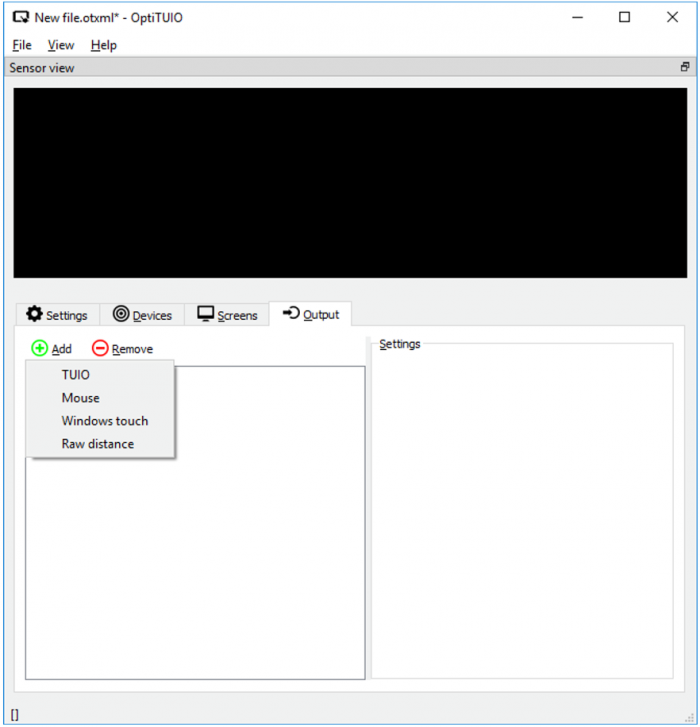 OptiTUIO Calibration: Output Type Selection Dialog
1. TUIO Output
TUIO (Tangible User Interface Object) is a standard protocol designed for transmitting multi-touch coordinates over network connections (UDP/OSC). Any client application supporting TUIO can read coordinates directly. Popular compatible platforms include Ventuz, Unity, VizRT, and Unreal Engine.
- Name: Custom label for the output.
- Host: The IP address of the system running the receiver application (default is localhost
127.0.0.1). - Port: The network port used to transmit packets (default is
3333). - Screen: Select whether to transmit coordinates from all active screens or a specific template.
2. Mouse Emulation
Controls the host OS mouse cursor directly using touch coordinates.
- Offset X / Y: Add a manual pixel offset to the cursor location.
- Size X / Y: Screen width and height boundaries in pixels.
- Screen: Maps mouse movement to a specific display.
- Mode Selection:
- Simple Mode: Tracks the first detected touchpoint and immediately moves the mouse cursor to that position, triggering a left click.
- Two-Click Mode: Designed for two-handed control. The first touchpoint positions the cursor without triggering actions. A second touchpoint triggers a left click if placed to the left of the initial point, or a right click if placed to the right.
Mouse Limitation Notice
Mouse emulation is limited to one active cursor. Operating systems cannot manage multiple independent mouse cursors natively.
3. Windows Touch Output
Simulates native Windows multi-touch API inputs. This enables multi-touch gestures directly within the Windows OS and compatible applications (such as browsers or native presentation software).
- Offset X / Y: Pixel offsets.
- Size X / Y: Screen width and height boundaries in pixels.
- Pressure: Windows Touch API exposes pressure parameters. OptiTUIO™ does not measure pressure; if your application requires a value, specify a default mock value here.
- Radius: Custom coordinate touch radius.
- Screen: Map coordinates to a specific display.
4. RAW Distance Output
An experimental output mode that transmits raw, uncalibrated distance measurements from the LiDAR sensor to a specified OSC address.
- Host: Target receiver IP (default
127.0.0.1). - Port: Target network port (default
7000). - Address: Custom OSC address path.